
H.E.R.O. for Vectrex
Going Native 6809

For the next physical release (~ end of 2026), I’m doing something different. No PiTrex this time — this one is a native 6809 Vectrex game. A real cartridge running real 6809 machine code on the original hardware, no Raspberry Pi in the loop. The game: a conversion of Activision’s H.E.R.O. from 1984 — the cave-diving rescue platformer that appeared on the 2600, ColecoVision, C64, and just about everything else, but never the Vectrex.
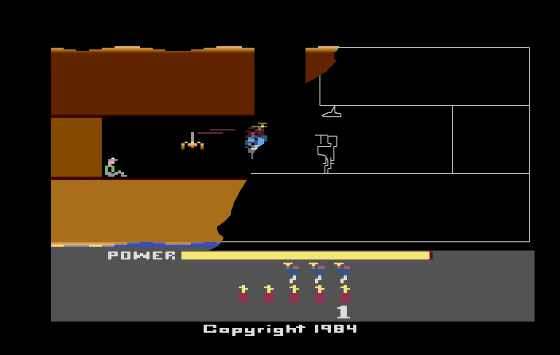
This article is a deep dive into how the project works: the game engine, the sprite system, the custom level editor with its built-in emulator, and the toolchain that bridges a Python IDE to a 6809 cross-compiler. It’s been a fascinating build, and I want to share the technical details.
The Game Engine
You know the original: Roderick Hero descends through cave systems with a helicopter backpack, a short-range laser, and a limited supply of dynamite. Shoot bats, blow through walls, and rescue the trapped miner at the bottom.
The Vectrex version implements the full gameplay loop in about 1,700 lines of C, compiled to native 6809 with the CMOC cross-compiler via the VectreC toolchain.
I know using VIDE and GCC is the standard, but I wanted to dig into the details. By further developing my own toolchain alongside my projects, I’m able to learn exactly how things work under the hood.
Physics
Gravity pulls at 1 unit per frame, clamped to terminal velocity 4. The prop-pack provides thrust of 3, but drains fuel — 255 starting units, 1 per frame of thrust. Walking is speed 2 on the ground, full directional control at speed 3 in the air. Collision resolution is split into two passes: move X and resolve, then move Y and resolve. This prevents diagonal phasing bugs where the player clips through corners — a subtle thing, but it makes the physics feel solid.
Weapons
The laser extends 40 units horizontally as a flickering segmented beam — alternating 8-unit segments toggled by the animation counter. It persists for 10 frames, checking against enemy hitboxes each tick. Dynamite burns for 60 frames with a blinking fuse, then explodes with a 25-unit radius. The explosion visual is two-stage: a starburst at full intensity, followed by an expanding X-pattern that fades over 20 frames. Walls within range are destroyed (75 points), enemies killed (50 points), and if you’re standing too close, you die too.
Enemies
Bats patrol horizontally, bouncing off room boundaries and vertical cave segments. Two wing-flap frames alternate at 8-tick intervals. Contact is instant death — a 30-frame blink sequence, then respawn or game over. More to come …
Rooms
Levels are composed of rooms connected by exits on all four sides. Cross a boundary, and the engine saves your wall-destruction state, swaps in the new room’s geometry, enemies, and segments, and restores any walls you’d previously blown up. Each room has its own cave polylines for rendering, extracted axis-aligned segments for collision, destroyable walls, bat spawns, and, optionally, a miner.
Collision
Everything is AABB. A single box_overlap() function handles all entity-vs-entity and entity-vs-wall tests using center points and half-dimensions. Cave geometry uses a dual representation: the polylines you see on screen, and a parallel set of axis-aligned segments extracted from them for the physics engine. Horizontal segments are floors and ceilings, vertical segments are side walls. Bats bounce off verticals. The player collides with everything.
Sprites: VLC with Embedded Metadata
You know the draw_vlc() BIOS call — pass it a pointer to count−1 followed by (dy, dx) pairs, and the beam traces the shape. Simple and fast, but the data knows nothing about itself. It doesn’t know its bounding box, and critically, it doesn’t know where its visual center is relative to the beam start position.
This matters for collision. The game checks player_y ± half_height against walls and enemies, so the collision box needs to be centered on the entity’s logical position. But the VLC starts drawing from the first vertex — which usually isn’t the center of the shape.
The solution is to embed metadata directly in the sprite arrays:
// Format: [hw, hh, oy, ox, count-1, dy1, dx1, dy2, dx2, ...]
int8_t player[] = {
    5, 11,   // half-width, half-height (collision box, pre-scaled)
    10, 6,   // Y,X offset from visual center to VLC start point
    18,      // 19 vectors (count - 1)
    0, -6,   // first delta pair...
    -4, 0,
    ...
};
Access macros keep the game code clean:
#define SPRITE_HW(s)   ((s)[0])   // collision half-width
#define SPRITE_HH(s)   ((s)[1])   // collision half-height
#define SPRITE_OY(s)   ((s)[2])   // Y offset: center → VLC start
#define SPRITE_OX(s)   ((s)[3])   // X offset: center → VLC start
#define SPRITE_VLC(s)  (&(s)[4])  // pointer to actual VLC data
The drawing sequence moves the beam to the entity’s logical center, applies the offset to reach the VLC start, draws the shape, then reverses the offset (This part is obviously not yet optimized and under progress):
moveto_d(player_y, player_x);                         // logical center
set_scale(0x6A);
moveto_d(SPRITE_OY(player), SPRITE_OX(player));       // → VLC start
draw_vlc(SPRITE_VLC(player));                          // draw (returns to VLC start)
moveto_d(-SPRITE_OY(player), -SPRITE_OX(player));     // → back to center
// propeller blades, legs drawn relative to center
The half-width and half-height are pre-scaled to match the sprite’s draw scale (hw = round(raw_hw × draw_scale / 0x7F)`), so the collision code reads them directly — no runtime division on the 6809.
Four sprites so far: the player (19 vectors at 83% scale), two bat frames (8 vectors each at 75% scale), a miner (25 vectors), and a dynamite stick (4 vectors at 38% scale). This also needs further optimizations.
The Game Editor
This is where I’ve spent as much time as on the game itself. The game editor is a 3,400-line Python/Tkinter application with three panels: Level, Sprite, and Emulator.
Level Editor
A 600×600 canvas mapped to the full Vectrex coordinate space. Six tools: cave line (polyline drawing, right-click to finalize), wall (click-drag rectangles for destroyable blocks), enemy (place bats with configurable velocity), miner, player start, and select. Each room’s geometry is independent — its own cave polylines, walls, enemies, boundaries, and exit connections to other rooms.
You can load a reference image as a background overlay. Scale and reposition to fit, lock it in place, then trace the cave layout in vectors on top. When you’re done, hide the image and see just the vector geometry.
Sprite Editor
A dedicated canvas for drawing VLC sprites point by point. As you place vertices, the editor computes the delta encoding in real time. Multi-frame animation is supported — the bat’s two wing positions are separate frames within the same sprite definition. VLC point animation is in planning.
The editor computes bounding boxes across all frames (taking the max extent) and calculates the centering offset from the origin to the first vertex. All of this gets embedded in the exported data, so the game code never has to compute it at runtime.
Emulator
The third panel embeds a full Vectrex emulator. Not an external process — a Python-based 6809 CPU emulator with VIA 6522 peripheral emulation and a vector renderer, running inside a canvas. It executes 30,000 cycles per 20ms tick, handles keyboard input mapped to the controller (arrows for joystick, A/S/D/F for buttons), and renders beam output as line segments. There’s a C extension for speed.
The integration is tight. Hit “Test Sprite” and the editor generates a minimal Vectrex program that displays that sprite with joystick-controllable position, scale, and rotation — compiles it with CMOC, and loads the ROM into the embedded emulator. Hit “Test Level” and it exports the full room data, generates C wrapper files that pull in the real game engine code, compiles the whole thing, and runs it. Full physics, enemies, dynamite, collision — the complete game, but with your current level. The cycle from editing a cave wall to flying through it is seconds.
Export
The editor exports sprites.h, sprites.c, and levels.h — C arrays ready to drop into `src/` and compile. The level data format is designed for zero runtime overhead: room lookup tables are pre-built as const arrays, cave segments are pre-extracted from polylines, and everything is indexed by room number for direct access. `make` compiles the game; `make run` compiles and launches the editor with the ROM loaded in the emulator tab.
The Toolchain
The game is compiled with CMOC targeting the 6809, via my VectreC toolchain. VectreC bundles the compiler with a Vectrex standard library that provides BIOS function bindings (draw_vlc(), moveto_d(), set_scale(), intensity_a(), etc.), ROM header pragmas, and the correct linker scripts. One make invocation takes six C source files to a ROM binary.
The code is organized into five hand-written files — main.c (game loop, state machine, collision helpers), player.c (physics, input, drawing), enemies.c (bat AI, laser, dynamite, miner rescue), drawing.c (cave rendering, HUD, screens), and levels.c (room management) — plus the editor-generated sprites.c.
Working Within 1 KB
The RAM budget is the constant constraint. The game currently uses about 182 bytes of the roughly 896 available after BIOS reservation.
Player state: 10 bytes — position, velocity, facing, fuel, dynamite, lives, ground flag, thrust flag. Each enemy: 5 bytes — position, velocity, alive flag, animation counter. Three enemies max on screen. Laser: 5 bytes. Dynamite: 6 bytes. Wall destruction: a single byte bitfield, supporting 8 walls per room, with a per-room backup array for room transitions.
Level data lives entirely in ROM. The current room’s cave lines, walls, enemies, and segments are accessed through pointers into cartridge space. A room transition just swaps six pointers — no copying, no decompression.
Types are chosen for size. Positions are int8_t. Counts, flags, and timers are uint8_t. The score is the only 16-bit value in the game. No malloc, no recursion, no stack allocation beyond function locals.
The ROM sits at about 8.3 KB currently, with 20 levels still to fill in. There’s room.
Beam Budget
The other constraint you don’t think about until it bites you: beam time. The Vectrex has a fixed frame time, and every moveto_d() and draw_line_d() costs cycles. Draw too many vectors and the display starts flickering — the beam can’t finish all the drawing before the next frame.
I use four intensity levels to create visual depth: dim (0x3F) for cave walls, normal (0x5F) for the player and enemies, high (0x6F) for the laser and dynamite fuse, and full bright (0x7F) only for explosions. During an explosion, the cave walls flash bright for a single frame — a cheap effect that sells the impact without adding vectors.
The explosion itself is drawn with just four lines: two diagonal crosses expanding from the detonation point. Combined with the intensity fade over 20 frames and the initial starburst (two more lines, horizontal and vertical), it reads as a much bigger effect than six lines should. Vector graphics reward economy — a few bright, well-placed lines communicate more than a screen full of detail.
What’s Next
The core engine is solid: physics, weapons, enemies, collision, multi-room navigation, scoring, and the rescue loop all work. The editor can design, test, and export complete levels. The immediate task is building out all 20 levels, adapting the original cave layouts to vectors.
The original game introduces new enemy types in later levels — snakes and spiders with different movement patterns — plus lava pits and increasingly complex cave geometry. Those are coming.
The plan is a physical cartridge release. Native 6809, real Vectrex hardware, no PiTrex required. I’ll share more later in the year, as the levels take shape. If you want to follow along, the development happens in the open — level design in a Python editor, compiled to 6809, tested in an embedded emulator, and eventually burned to a real EPROM.
More soon.
Very much looking forward to seeing this progress.